Automatic Inclusion
Due to the agentless nature of Datto Backup for Microsoft Azure: Azure Files & Azure Blob Storage, it allows for new resources to be protected automatically without a configuration change.
Environment 
- Datto Backup for Microsoft Azure: Azure Files
- Datto Backup for Microsoft Azure: Azure Blob Storage
Description
While adding a new Azure tenant for protection or updating the configuration of a currently protected Azure tenant, you will select the Backup Level Assignment. This determines what resources of the selected workload are included for protection. The workload is the type of resource that is being protected. The current workloads available for protection are:
- Azure Files
- Azure Blob Storage
Individual Resource selection allows for the most granular selection options and only the resources selected will be included. This is the only assignment level that does not have automatic inclusion. To add any new resource, the Azure tenant will need to be edited from the Tenants page to include it.
When using the following Backup Assignment Levels, any resource within that selected assignment level will be included for protection by default. Individual resources that should not be protected may be deselected from the files tree, these resources will be exempt from the automatic inclusion. Any new resources of the chosen type, added within an included parent, will be protected by default.
- Tenant
- Subscription
- Resource Group
- Storage Account
NOTE Automatic inclusion only applies to tenants in the Online state. Tenants in the Draft or Failed state are not processed.
When a resource is added for protection automatically, based on the assignment level selected, a notification is sent to the Activity Center.
Automatic inclusion icon 
Assignment levels that support automatic inclusion are identified by the automatic inclusion icon: 
The icon appears in the onboarding wizard next to assignment levels where automatic inclusion is available, and in the Protection Level column of the Tenants module. It can be used to quickly confirm that new resources within the selected scope will be included automatically.
Assignment Levels
 Tenant
If the Tenant assignment level is selected, then each resource of the Azure tenant that is added will be included for protection, regardless of lower-level organization (Subscription, Resource Group, or Storage account). While other levels may not be excluded from protection, individual resources may be excluded from protection and will not be subject to the automatic inclusion.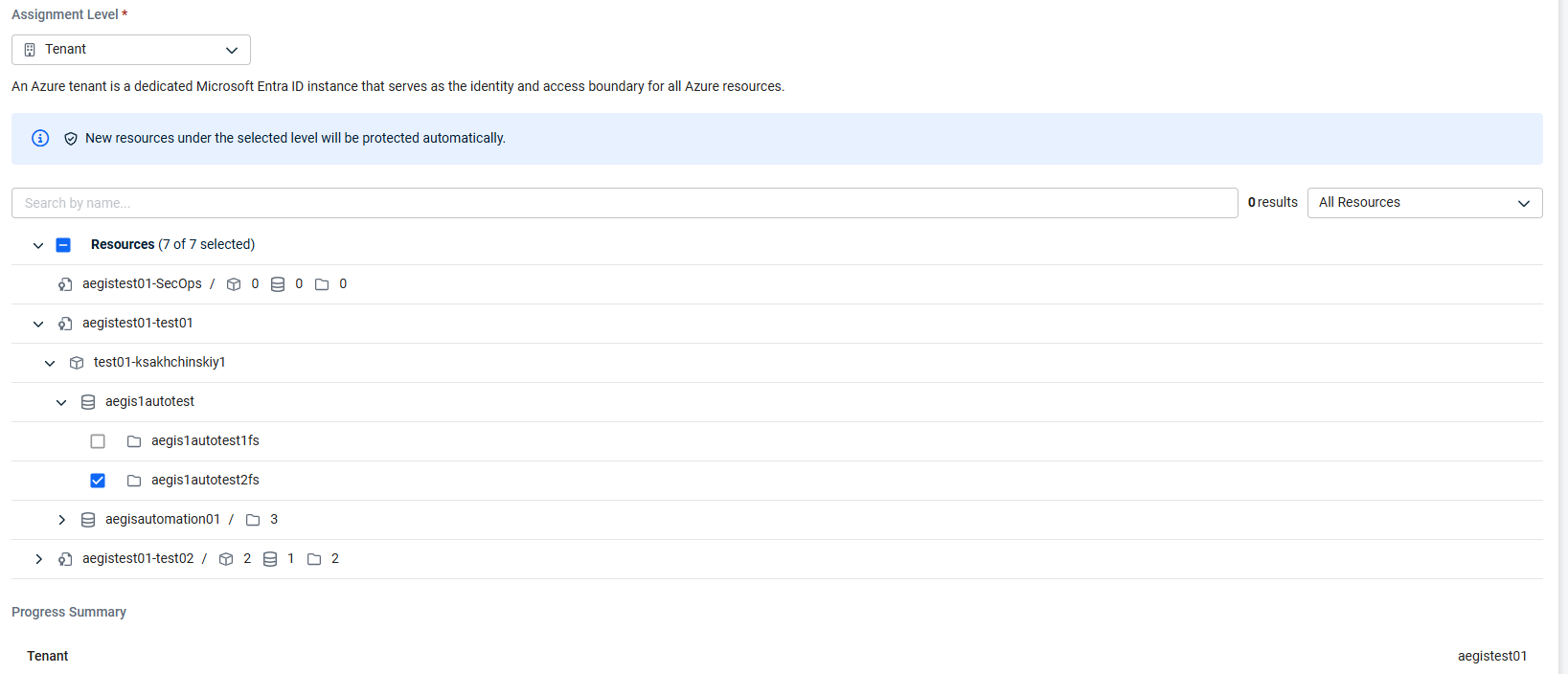
In this example, the Tenant Assignment level is selected. All supported resources within the Azure tenant are included when it is selected by default, but an individual share, aegis1autotest1fs was selected to be excluded. This will be the only current resource excluded from protection and if a new Azure File share is added to the Azure tenant, then it will be protected automatically without the need for further configuration changes needed.
Subscription
If the Subscription assignment level is selected, then the desired Subscription(s) will need to be selected from the tree below. Once selected, all resources of the workload included in the Subscription(s) will be included for protection, regardless of the lower-level organization (Resource Group or Storage Account). Resources in Subscription(s) not selected will not be protected.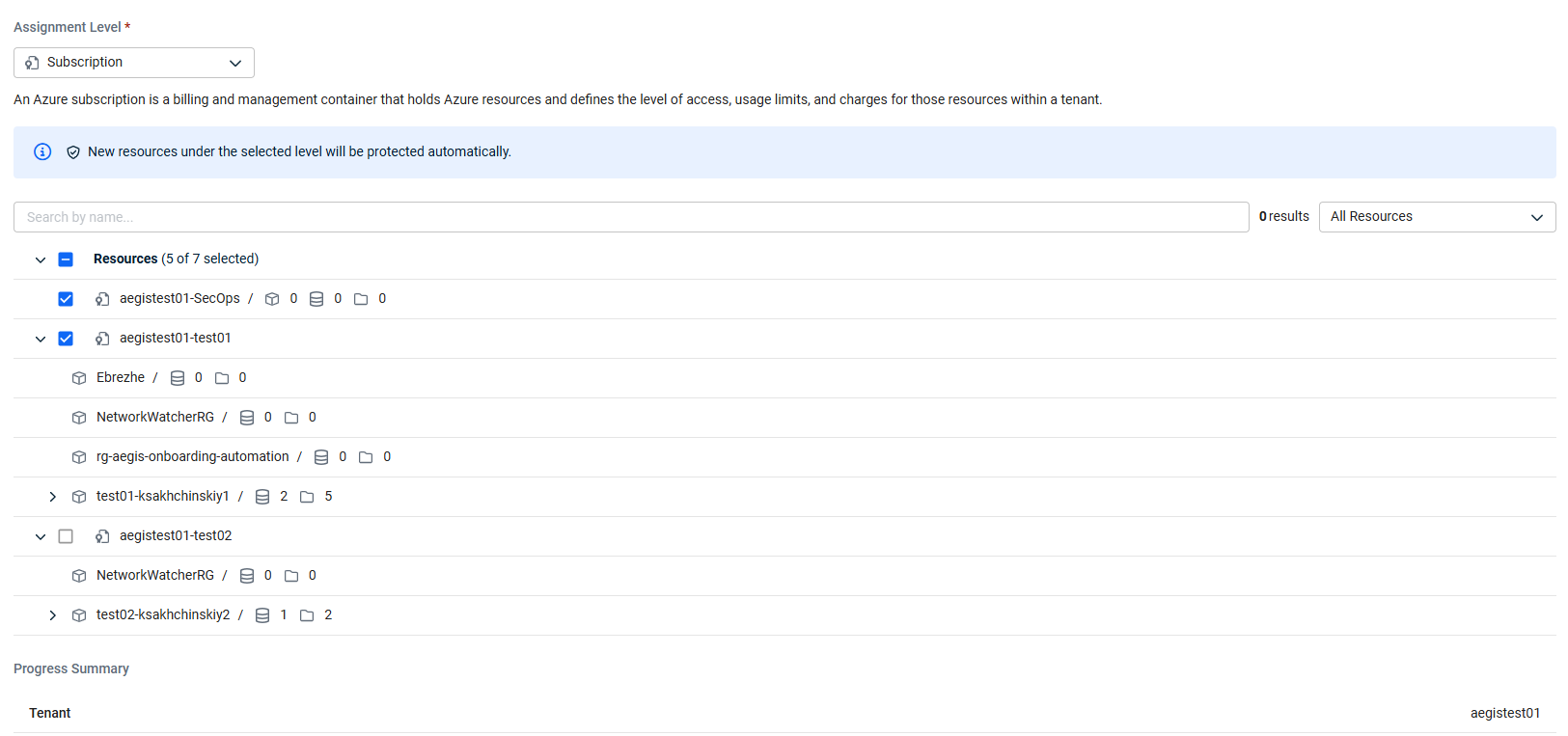
In this example, all Azure File shares in aegistest01-test01 will be protected, but shares in aegistest01-test02 will not be. aegistest01-SecOPs is also selected for protection, despite no currently supported resources for protection being available. If an Azure File Share is added to aegistest01-test01 or aegistest01-SecOPs in the future, it will be protected automatically without the need for further configuration. If a share is added to aegistest01-test02 that needs to be protected, then the configuration will need to be updated to include aegistest01-test02 as well, or another assignment level will need to be used.
Resource Group
If the Resource Group assignment level is selected, then the desired Resource Group(s) will need to be selected from the tree below. Once selected, all resources of the workload included in the Resource Group(s) will be included for protection, regardless of the lower level organization (Storage Account). Resources in Resource Group(s) not selected will not be protected.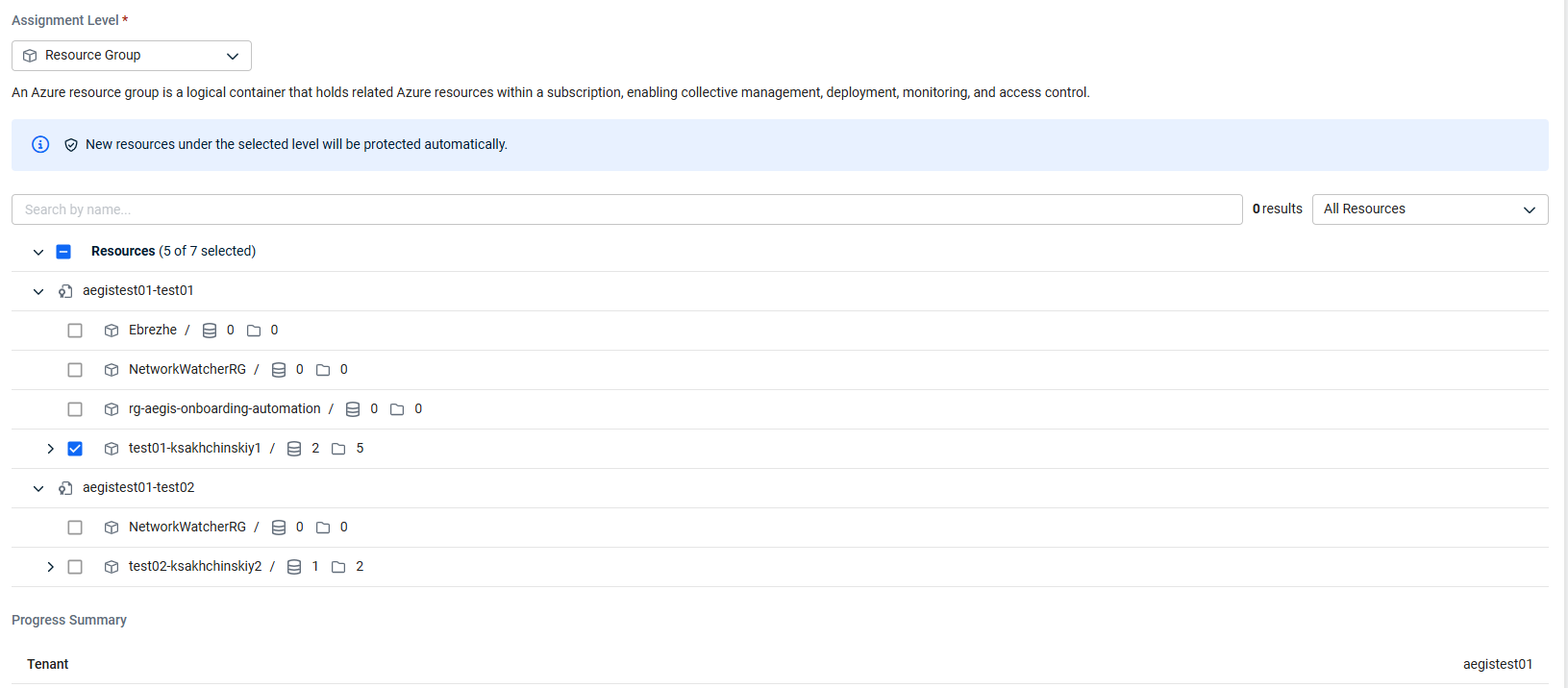
In this example, all Azure File shares in test01-ksakhchinskiy1 will be protected, but shares in NetworkWatcherRG and the other unselected Resource Groups will not be. If a Azure File Share is added to test01-ksakhchinskiy1 in the future, it will be protected automatically without the need of further configuration. If a share is added to NetworkWatcherRG that needs to be protected, then the configuration will need to be updated to include NetworkWatcherRG as well, or another assignment level will need to be used.
NOTE The aegistest01-SecOps subscription, from the previous example, is not present in the file tree because no Resource Groups currently exist within it.
Storage Account
If the Storage Account assignment level is selected, then the desired Storage Account(s) will need to be selected from the tree below. Once selected, all resources of the workload included in the Storage Account(s) will be included for protection. Resources in Storage Account(s) not selected will not be protected.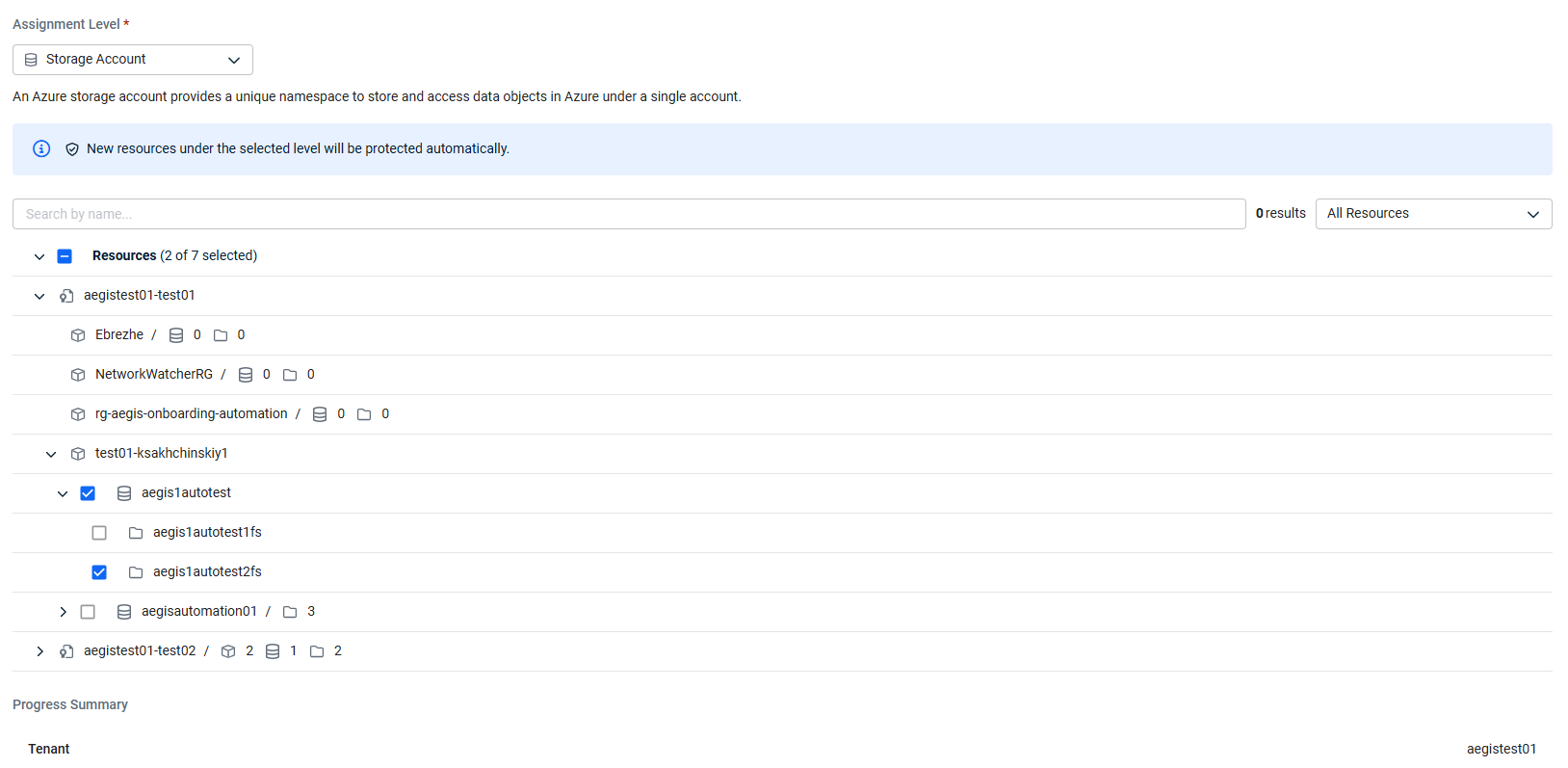
In this example, Azure File shares in the aegis1autotest will be protected, except for aegis1autotest1fs because it was deselected manually. Shares in aegisautomation01 will not be. If an Azure File Share is added to aegis1autotest in the future, it will be protected automatically without the need of further configuration. If a share is added to aegisautomation01 that needs to be protected, then the configuration will need to be updated to include aegisautomation01 as well, or another assignment level will need to be used.
File Share
If the File Share assignment level is selected, then each resource or level that needs protection will need to be selected from the tree below. Once selected, all resources of the selected workloads will be included for protection. Resources not selected will not be protected.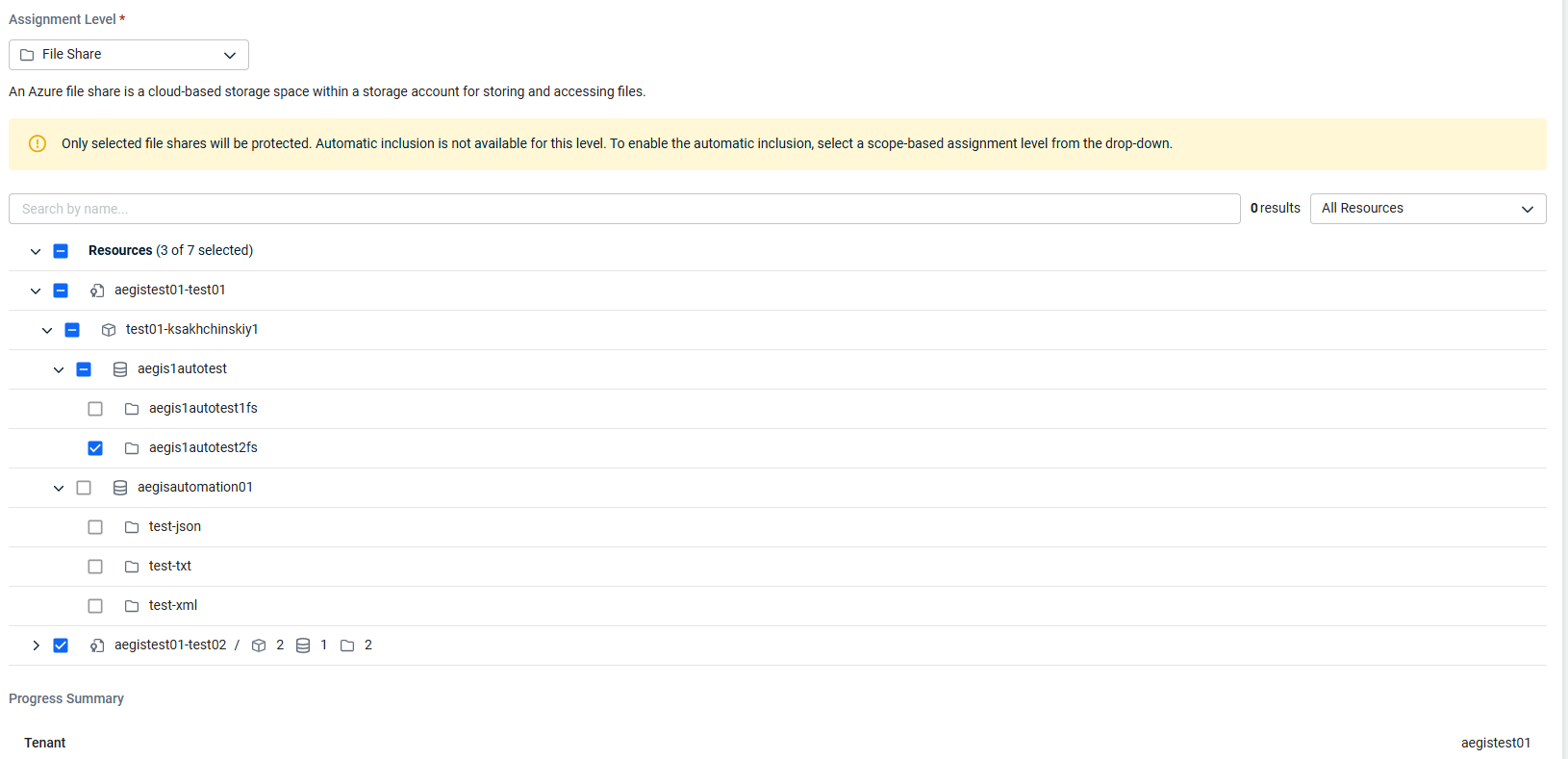
In this example, the file share aegis1autotest2fs was selected individually, as well as the Resource Group aegistest01-test02. This means that aegis1autotest2fs and all shares currently within aegistest01-test02 will be protected. If any share is added to the Azure tenant, including to aegistest01-test02 after onboarding completes, then it will not be protected by default. If it needs to be protected, then the configuration will need to be updated from the Tenants page.
Automatic inclusion retries
If a new resource is not automatically included as expected, the system will retry inclusion automatically. No manual intervention is required. Inclusion errors for individual resources do not affect other resources or tenants. The tenant remains in the Online state throughout.
If a resource cannot be added to protection as expected due to its Azure state, for example when it is being deleted in Azure, a notification is sent to the Activity Center.


