Audit log
Audit logs provide a detailed record of user activities, system changes, and administrative actions to support security monitoring, compliance requirements, troubleshooting, and operational visibility.
Benefits
Security and Compliance: Track access patterns, detect unauthorized activities, and maintain audit trails for compliance frameworks such as System and Organization Controls 2 (SOC 2), International Organization for Standards (ISO 27001), General Data Protection Regulation (GDPR), and Health Insurance Portability and Accountability Act of 1996 (HIPAA).
Operational Visibility: Monitor configuration changes, track policy modifications, and understand system usage patterns.
Troubleshooting: Investigate issues by reviewing the sequence of events leading to a problem or configuration change.
Accountability: Maintain clear attribution of all actions to specific users with timestamps and contextual information.
Accessing the audit log
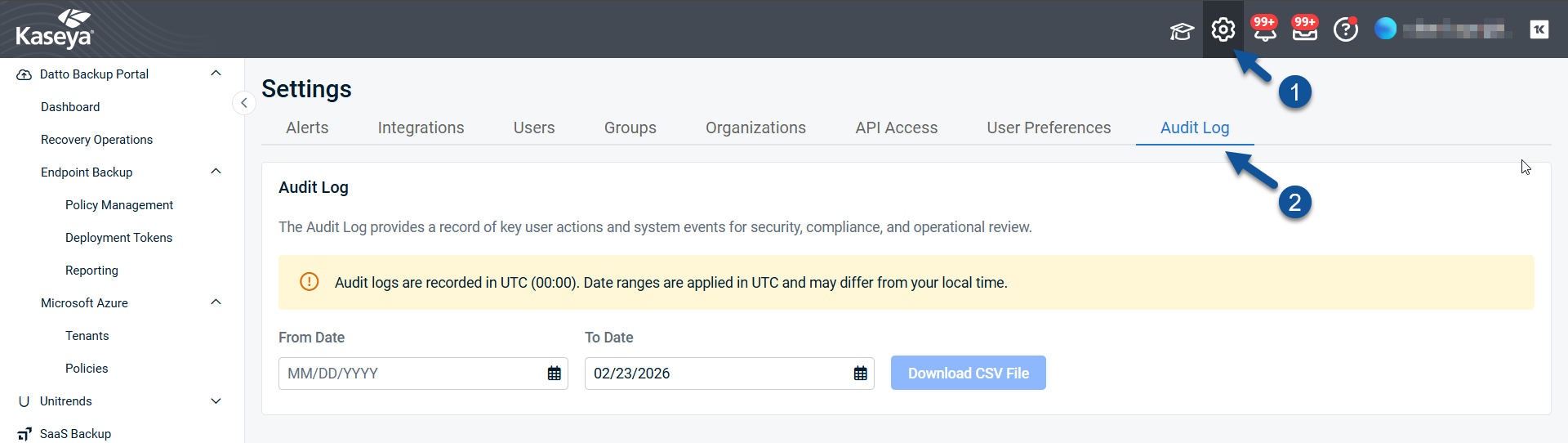
Superusers reach the audit log by clicking the settings cog in the header, then Audit Log.
Downloading an audit log
NOTE Audit logs use Coordinated Universal Time (UTC).
Date ranges are applied in UTC, which may differ from your local time.
- Choose an Event Category to download.
- Enter a From Date or pick a date from the calendar.
- Enter a To Date or pick a date from the calendar.
- Click Download CSV File.
- The audit log file will download in your web browser.
Event categories in detail
User access events
| Event Type |
Captured Information |
| Email/Password Login |
Username, source IP address, authentication method, login status (success/failure), 2FA verification/configuration if applicable, timestamp, session ID |
| VSA 9 Login |
Username, VSA user mapping status, source IP address, timestamp |
| VSA X Login |
Username, source IP address, timestamp |
| K1 Login |
Username, K1 authentication status, K1 user mapping status, access groups assigned, timestamp |
| Deliberate Logout |
Username, timestamp |
| Automatic Logout |
Username, timestamp |
User management events
| Event Type |
Captured Information |
| User Creation |
New username, created by, creation status (attempting/creating/created/failed), scope assignment status, timestamp |
| User Activation |
Username, invitation validation status, activation status, timestamp |
| User Deletion |
Username, deleted by, deletion status (attempting/deleting/deleted/failed), timestamp |
| User Update |
Username, updated by, update status (updating/updated/failed), previous values, new values, timestamp |
| Activation Email Resend |
Username, email sending status (sending/sent/failed), timestamp |
| K1 User Deactivation |
Username, deactivated by (K1 external system), deactivation status, timestamp |
| K1 User Deletion |
Username, deleted by (K1 external system), deletion status, timestamp |
Group management events
| Event Type |
Captured Information |
| Group Creation |
Group name, created by, creation status, timestamp |
| Group Update |
Group name, updated by, previous values, new values, timestamp |
| Group Deletion |
Group name, deleted by, timestamp |
| Global Scope Creation |
User ID, tenant ID, created by, creation status, timestamp |
| User Group Assignment |
User ID, group IDs, assigned by, assignment status, previous groups, new groups, timestamp |
| User Group Update |
User ID, group IDs, updated by, previous groups, new groups, timestamp |
| K1 Group Assignment |
User ID, K1 group IDs, assigned by, assignment status, timestamp |
| K1 Access Groups Sync |
Username, K1 access group IDs, sync status (syncing/synced/failed), timestamp |
Asset management events
| Event Type |
Captured Information |
| Asset Upsert |
Asset name, hostname, OS, policy ID, license type, organization ID, storage used, upsert status, timestamp |
| Asset Update |
Asset name, updated fields, previous values, new values, update status, timestamp |
| Asset Deletion |
Asset name, deletion status, timestamp |
Policy management events
| Event Type |
Captured Information |
| Policy Creation |
Policy name, created by, initial configuration, creation status, timestamp |
| Policy Update |
Policy name, updated by, modified fields, previous values, new values, update status, timestamp |
| Policy Deletion |
Policy name, deleted by, deletion status, timestamp |
| Policy Threshold Upsert |
Policy name, threshold configuration, upsert status, timestamp |
| Policy Threshold Deletion |
Policy name, threshold ID, deletion status, timestamp |
Deployment token management events
| Event Type |
Captured Information |
| Token Creation |
Token details, created by, creation status, timestamp |
| Token Deletion |
Token ID, deleted by, deletion status, timestamp |
| Token Pairing |
Token ID, pairing status, timestamp |
Restore operations
| Event Type |
Captured Information |
| Restore Upsert |
Endpoint name, restore details, upsert status, timestamp |
| File-Level Recovery |
Endpoint name, restore type (original/new location/alternate/zip), restore status, timestamp |
| Single-File Multi-Version Bundle |
Endpoint name, file path, version selection, bundle status, timestamp |
| Single-File Multi-Version Recover |
Endpoint name, file path, recovery type (original/new location/alternate/zip), recovery status, timestamp |
| Single-File Multi-Version Restore |
Endpoint name, file path, restore type (original/new location/alternate/zip), restore status, timestamp |
| Bare Metal Recovery (BMR) |
Endpoint name, restore point, BMR status, timestamp |
Reporting events
| Event Type |
Captured Information |
| Report Schedule |
Report name, schedule configuration, scheduling status, timestamp |
| Report Upsert |
Report name, report configuration, upsert status, timestamp |
| Report Deletion |
Report name, deleted by, deletion status, timestamp |
| Report Snapshot Resend |
Report name, resend status, timestamp |
Audit log column reference
| Column |
Description |
Type |
Notes |
| Id |
Unique identifier for the audit event |
UUID |
Used to correlate events across systems or logs |
| TenantId |
Identifier of the tenant that owns this event |
UUID |
Used to correlate events across tenants |
| Timestamp |
Date and time when the event occurred |
ISO‑8601 timestamp |
Stored in UTC |
| WorkflowId |
Correlation ID linking related events across a business process |
UUID |
Groups related events (e.g., all steps of a user creation) |
| WorkflowType |
Type/category of the workflow |
String |
Examples: user:creation, scope:create, epbpolicy:update |
| EventType |
Specific event within the workflow |
String |
Examples: user:creating, user:created, user:creation-failed |
| EventDescription |
Human-readable description of the event |
String |
|
| Initiator |
Identity that initiated the action |
String |
User email, service name, or “K1” for external systems |
| InitiatorType |
Type of the initiator |
String |
Values: tenant-user, system-user, system, external-system, vsa-user, anonymous |
| InitiatorId |
Unique identifier of the initiator |
String |
May map to a user ID, service account, or internal identifier |
| Target |
Name or description of the target entity |
String |
Examples: user email, scope name, policy name |
| TargetType |
Type of object affected by the action |
String |
Values: user, organization, scope, globalScope, userScope, k1Scope, epbAsset, ebpPolicy, ebpPolicyThreshold, epbRestore, epbReport, deploymentToken, cooperbotK1AccessGroups, cooperbotK1User |
| TargetId |
Unique identifier of the target entity |
String |
Used with TargetType to pinpoint the affected entity |
| OperationStatus |
Status of the operation |
String |
Values: success, failure, warning, inProgress |
| CustomValues |
Additional event-specific data |
JSON |
Contains input parameters, contextual information |
| OriginalState |
State of the target before the operation |
JSON |
Useful for audit trails showing what changed |
| UpdatedState |
State of the target after the operation |
JSON |
Useful for audit trails showing what changed |
Filter categories
Events can be filtered by the following categories in the UI:
| Category |
Workflow Types Included |
| User Access |
Email/password login, VSA 9 login, VSA X login, K1 login, deliberate logout, automatic logout |
| User Management |
User creation, user activation, user deletion, user update, activation email resend, password reset, K1 user deactivation, K1 user deletion |
| Group Management |
Group creation, group update, group deletion, global scope creation, user group assignment, user group update, K1 group assignment, K1 access groups sync |
| Asset Management |
Asset upsert, asset update, asset deletion |
| Policy Management |
Policy creation, policy update, policy deletion, policy threshold upsert, policy threshold deletion |
| Access & Tokens |
Deployment token creation, deployment token deletion, deployment token pairing |
| Restore Operations |
Restore upsert, file-level recovery, single-file multi-version bundle, single-file multi-version recover, single-file multi-version restore, BMR |
| Reporting |
Report schedule, report upsert, report deletion, report snapshot resend |
Usage notes
- Filter by action, result, or initiator to isolate relevant activity.
- Sort by Timestamp to reconstruct timelines.
- Use WorkflowId to group related events from the same business process.
- Copy CustomValues JSON into a JSON-aware tool for deeper analysis.