Using Quiescing Scripts with Linux Agents
This article covers the purpose of quiescing scripts and how to configure them for use with local BCDR devices on protected machines using the Datto Linux Agent.
Environment 
- Datto ALTO
- Datto SIRIS
Description
Quiescing scripts allow processes on a protected Linux system, including databases and other applications, to be paused or modified during a backup to ensure application-consistent snapshots that include pending transactions. Datto provides three default scripts that you can configure to work with MongoDB, MySQL or PostgreSQL. You can also create custom quiescing scripts.
The Datto Linux Agent stores its script files in /etc/datto/dla/pps on the protected server.
Procedure 
To activate the quiescing scripts:
Open the GUI for the Datto device.
Click the Protect tab.
Navigate to the agent that you wish to configure.
Click Configure Agent Settings for that agent.
Scroll to the Advanced section to find the Quiescing Scripts option.
Check the boxes next to the scripts you want to activate.
 Configuring MongoDB
 Edit the MongoDB script.
nano /etc/datto/dla/pps/mongodb.sh
Replace all instances of the name admin with the name of your database.
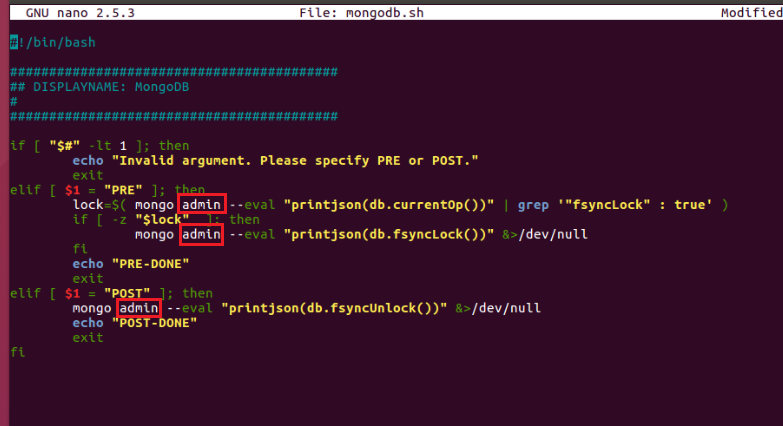
After updating the file, press Ctrl + O to save the changes.
Press Ctrl + X to exit the editor.
Configuring MySQL Edit the MySQL script.
nano /etc/datto/dla/pps/mysql.sh
Enter the username and password of your SQL database in the u= and P= fields.

After updating the file, press Ctrl + O to save the changes.
Press Ctrl + X to exit the editor.
Configuring PostgreSQL Edit the PostgeSQL script.
nano /etc/datto/dla/pps/postgres.sh
Add the --dbname=DBNAME modifier to the postgres commands.
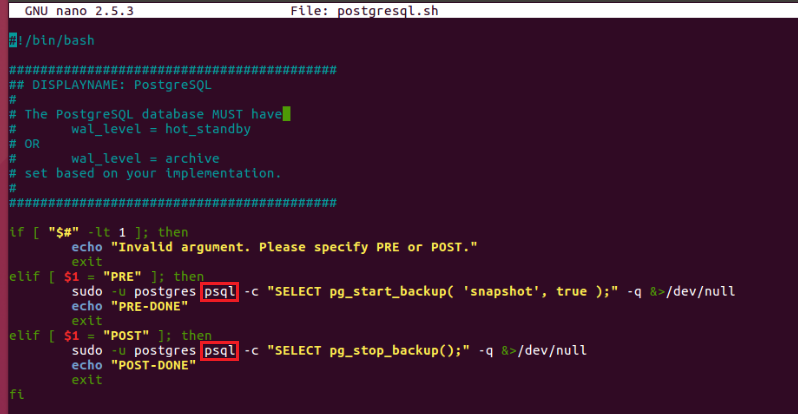
To change databases, replace DBNAME with the name of your database.
After updating the file, press Ctrl + O to save the changes.
Press Ctrl + X to exit the editor.
Custom Quiescing Scripts You can use any of these templates to create custom quiescing scripts. Your scripts must be stored in:
/etc/datto/dla/pps/
The script needs to be able to operate on these options:
elif [ $1 = "PRE" ]; then
elif [ $1 = "POST" ]; then
In addition, use chmod to make your script executable:
chmod +x /etc/datto/dla/pps/[example script].sh
Make sure the script has the same permissions as the other scripts in the directory (Access: (0755/-rwxr-xr-x)). In the Datto appliance GUI, navigate to the Quiescing Scripts section of the protected agent's Configure Agent Settings. Click Refresh Scripts, and the new script will show up as an option in the list.
Additional Resources
Pause or resume a database mirroring session (external link)


