Screenshot Verification failure: Filesystem corruption
Troubleshooting information for a screenshot verification failure with an error message similar to:
The file system structure on the disk is corrupt and unusable. Please run the Chkdsk utility on the volume C:.
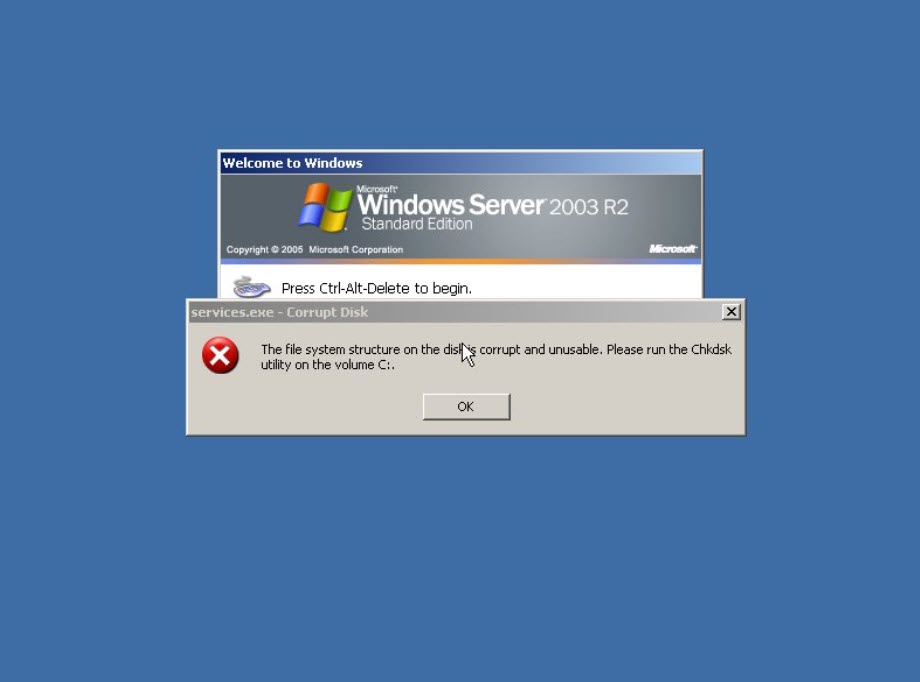
The file or directory <path> is corrupt and unreadable. Please run the Chkdsk utility.
Corruption detected. Unmount and run xfs_repair.
Environment 
- Datto SIRIS
- Datto ALTO
Cause
The screenshot verification failed because the operating system reported file system corruption on one or more volumes (NTFS metadata/structure damage). In some cases, the OS may reach the logon screen, but functionality can be degraded or blocked until the corruption is repaired.
Common causes include an unclean shutdown, underlying disk/storage issues, or inconsistencies in the recovered image. This error can be treated the same as a failed integrity verification check on the backup point.
Resolution
To confirm the backup is accurately recording the system state, you should run a differential merge to re-scan the entire protected machine. This will take more time to complete than a normal incremental backup. Once it completes, test the new backup point for bootability with a screenshot or local virtualization.
Windows
This error is most commonly occurring on Windows Server 2003. Run a read-only chkdsk on the affected server and view the results. Address any issues the chkdsk finds. If the chkdsk finds no issues and the local verification still fails, proceed with the next step.
Run a check disk on the affected server (a server reboot will be required).
chkdsk /f /r
Review disk/storage health and Windows event logs; if corruption returns or CHKDSK cannot repair, treat as a storage integrity/failing disk issue and restore/migrate from a known-good recovery point.
Once the system health is addressed, run another Differential Merge backup.
Linux
Schedule an offline repair of the production machine. Unmount the volume and run xfs_repair (XFS) or fsck (ext*) on the volume reporting errors. If errors recur after the repair, investigate storage/I/O health and restore from a known-good recovery point.
Once the system health is addressed, run another Differential Merge backup.
Additional Troubleshooting 
If you need assistance interpreting the error, contact Datto Technical Support for further assistance.


