Microsoft Azure – Tenants
Datto Backup for Microsoft Azure protects assets by adding the Azure tenant for protection. This page allows you to view currently protected Azure tenants, their status, and add new Azure tenants.
Environment 
- Datto Backup for Microsoft Azure: Azure Files
- Datto Backup for Microsoft Azure: Azure Blob Storage
Description
The Tenants page is used to review the current Azure tenants protected with Datto Backup for Microsoft Azure: Azure Files & Azure Blob Storage. It also allows for the protection of new Azure tenants. 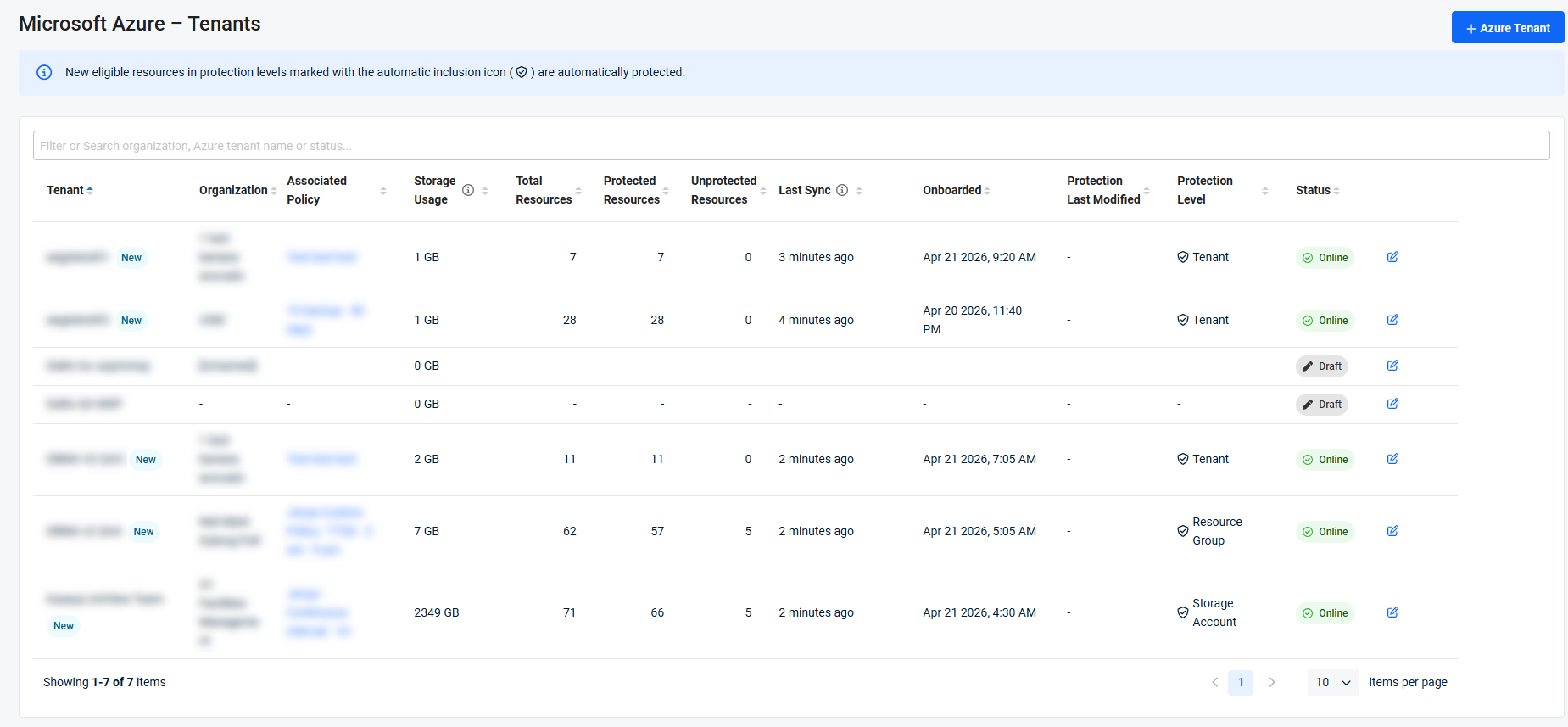
Page overview 
The Tenants page displays the currently paired tenant(s) associated with the account. The list includes information about the pairing, including:
 Tenant
The name of the paired Azure tenant. Newly onboarded tenants display a New label next to the tenant's name for up to 48 hours after onboarding completes successfully. The label is informational and does not affect protection status or system behavior.
Organization
The client organization that owns the Azure tenant.
Associated Policy
The policy chosen for the assets belonging to the Azure tenant. Selecting the policy will direct you to the Policy Management page and open the Edit Policy drawer, for the policy selected.
Storage Usage
Total storage consumed by the backed up data of the protected assets associated with the Azure tenant.
Total Resources
Displays the total number of resources for the Azure tenant that are eligible for protection.
Protected Resources
The number of resources belonging to the Azure tenant, that are protected by the current configuration.
Unprotected Resources
Displays the number of unprotected resources for the Azure tenant that are eligible for protection but are currently excluded.
Last Sync
The most recent scan of the Azure tenant to detect new or updated resources and metadata. Assignment levels with automatic inclusion
Onboarded
Displays the date and time at which the onboarding process completed. Displays a dash for drafts.
Protection Last Modified
Displays the date and time which the settings were most recently changed.
Protection Level
The scope of backup protection assigned to the tenant (for example, Tenant, Storage Account). Protection levels that include automatic inclusion display the automatic inclusion icon next to the level name. New eligible resources in these protection levels are automatically included in backup. For more information on the assignment level and automatic inclusion, refer to: Automatic Inclusion
Status
Each tenant is assigned a state that reflects the current stage of its onboarding or modification lifecycle.
-
Draft: Assigned when an onboarding session is interrupted before the user confirms and applies settings. Draft tenant assets are not visible in protection workflows and are excluded from all scan operations.
-
Onboarding: Default state after the onboarding wizard closes following initial onboarding. It indicates that onboarding is in progress or awaiting completion with retries.
-
Online: Assigned after successful or partially successful onboarding or modification. Confirms that the tenant is reachable and protected. A warning indicator is displayed if onboarding is completed with issues. Newly onboarded tenants are labeled as New for up to 48 hours.
-
Updating: Default state after the onboarding wizard closes following a tenant protection modification. Indicates that the modification is in progress or awaiting completion with retries.
-
Failed: Assigned when the system fails to complete tenant onboarding. Failed tenants remain visible in the Tenants module. Hover over the status indicator to view a tooltip directing you to the Activity Center for details.
Auto-inclusion and auto-update processes apply only to tenants in the Online state.
Each of these columns can be used to sort the list for navigation and organization purposes.
Filtering and searching
The Tenants page supports filtering, using the search bar, by tenant state and organization. The following applies to filters:
-
Multiple states or organizations can be selected simultaneously.
-
The tenant list updates in real time as filters are applied.
-
Filter selections persist within the same browser session.
-
All applied filters can be cleared at once using Clear all filters.
The search function may be used simultaneously or in place of the filtering options, to narrow the results by name or another field.
Adding a new tenant
To protect resources in a unprotected Azure tenant, it can be added by selecting + Azure Tenant in the top right of the screen. For more information onboarding a new Azure tenant, refer to: Azure tenant onboarding.
Resuming Azure tenant onboarding
If the onboarding was interrupted or paused, it will be listed as a Draft in the Status column. Select the icon in the far right of the row to resume onboarding.
If onboarding is resumed after the Backup Level Assignment step and the query of resources is different from what was previously available, it will be resumed from that point, regardless of where it was left off. The selection(s) will need to be made again to confirm the options with the new resources available.
Resume the Azure tenant onboarding process from the step displayed to complete the onboarding.
Updating existing configurations
To edit the configuration of a previously added Azure tenant, select the edit icon from the row of the desired Azure tenant. You will need to follow the Azure tenant onboarding process, similar to when it was first onboarded to make the adjustments to the protection level, organization mapping, and policy assignment.
If you would like to adjust the policy itself, it can be done so on the Microsoft Azure – Policy Management page or by selecting the policy from the Associated Policy column.


