Understanding Endpoint Backup billing and usage
Module: Endpoint Backup v2
To understand your total Endpoint Backup bill, you need to combine your Endpoint Backup v1 usage and your Endpoint Backup v2 usage.
Billing for each asset is based on which version of Endpoint Backup is active on that asset.
If an asset is currently protected with Endpoint Backup v2 and also has backups from Endpoint Backup v1, that asset is only billed for its v2 usage.
NOTE This is the common scenario when an asset migrates from Endpoint Backup v1 to Endpoint Backup v2.
If an asset has only Endpoint Backup v1 backups, it will only be billed for that v1 usage.
NOTE This applies to any asset that has not been upgraded from Endpoint Backup v1 to Endpoint Backup v2.
If an asset has only Endpoint Backup v2 backups, it will only be billed for that v2 usage.
NOTE This applies to any new asset you deploy directly in Endpoint Backup v2 without upgrading from Endpoint Backup v1.
Integrated customer billing 
Integrated Customer Billing automates how you bill customers for Endpoint Backup services, using either Autotask or BMS. It updates Autotask/BMS contracts with actual product usage so you can bill live consumption, removing manual reconciliation, speeds revenue capture, and reduces invoice errors and rework. KaseyaOne acts as the hub, pulling usage from Endpoint Backup and pushing it into Autotask/BMS. You can map customers one to one or map many organizations to a single Autotask/BMS account. Consumption from Endpoint Backup maps to Autotask/BMS Services inside Contracts. Quantity changes can be prorated daily or adjusted at month end, and you can manage multiple products from one place.
NOTE Billing and usage data for Endpoint Backup is sent over from the Datto Partner Portal.
Configuration
- Datto Partner Portal: Configure KaseyaOne integration (Unified Login) in Datto Partner Portal as security admin following the steps outlined in KaseyaOne integration with Datto Partner Portal.
- Autotask: Follow in the steps outlined under Enabling and configuring Integrated Customer Billing.
- BMS: Follow the steps outlined under Integrated customer billing.
How to see usage for Endpoint Backup v1 assets
Your assets that have not been upgraded to Endpoint Backup v2, but are still protected by Endpoint Backup v1 are included in your total bill based on their Endpoint Backup v1 storage.
You can see usage for Endpoint Backup v1 assets with Datto Partner Portal: Device Details> Replication Details.
How to see usage for Endpoint Backup v2 assets
The Backup Usage tile in Endpoint Backup v2 shows the storage used for the displayed assets.
NOTE Use the Organization drop-down to filter the displayed assets to one organization and see how much storage that organization uses.
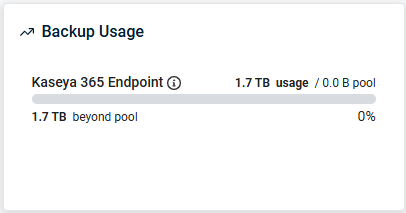
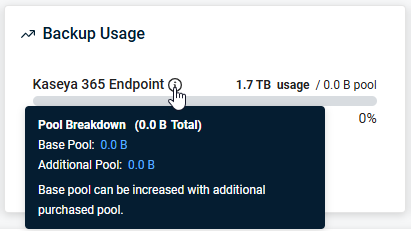
Hover over the  to see details about the storage pool.
Related topic: Endpoint Backup v2 first time access
Related topic: Upgrading from Endpoint Backup v1 to v2


