Datto Partner Portal: Offsite Audit Report
This article explains the Offsite Audit Report. This report shows what recovery points are in the cloud, the characteristics of that data, and how much space that data uses. For more information about how Dattos Inverse Chain Technology works, see the article Explaining the Inverse Chain.
Environment 
- Datto ALTO
- Datto SIRIS
- Datto Partner Portal
Description
The Offsite Audit Report gives you a comprehensive report of the Datto device's offsite backups, including:
- Total device size
- Information about the cloud server
- Active datasets per protected machine
- OLDCHAIN datasets stored for archival purposes
- Datasets in the Cloud Recycle Bin pending removal
- Breakdown of stored recovery points for each agent
Running an offsite audit can take a long time. You do not need to stay on this page while it runs. If over an hour has elapsed and you do not have results from this audit, contact Datto Technical Support.
NOTE The offsite audit runs once per day; re-running the audit will generate the same report information.
Running an audit

Login to partners.dattobackup.com.
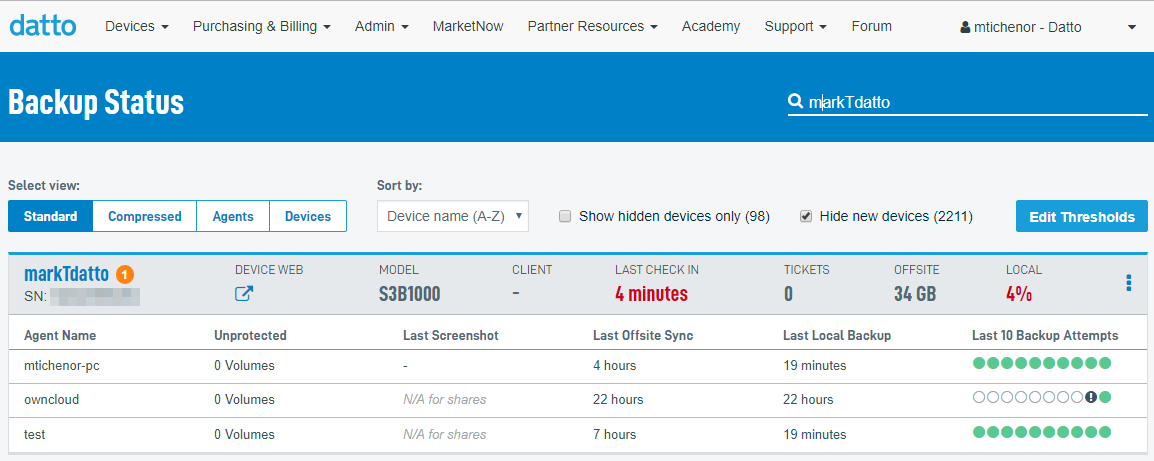
Click on the Devices menu, and click BCDR Status.
Click on the name of the device you wish to audit.
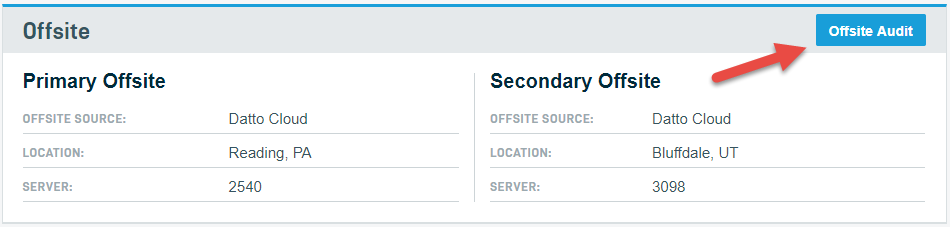
Scroll down the page to the Offsite section and click the Offsite Audit button. The report will start running. It will automatically open when done.
Reading the report
The report provides the offsite data for each dataset that exists associated with the Datto device that the report was run for. It provides these with the dataset keynames, asset type, and the size of the protected dataset.
The report does not currently associate these datasets with active agent's names. This association will need to be made manually by comparing recent backup points, dataset size, or by using the key name in the Remote Web for an active agent. To view the Key name for an agent:
- Log into the Remote Web.
- Select Protect.
- Click Managed Recovery Points for the suspected agent.
- On this page, the offsite points will be displayed as well as the local unique sizes. In addition the Keyname of the agent will be in the URL of the page.
If you are unable to identify a dataset or have any questions on interpreting the report, please reach out to Datto Technical Support.
OLDCHAIN data
Entries in the Offsite Audit report appended with the prefix 'OLDCHAIN,' such as "OLDCHAIN-1441652484-rsync4" indicate orphaned backup chains which are not associated with any active or archived datasets on your Datto appliance. Users cannot manually manage or restore these backup chains. To restore, delete, or migrate OLDCHAIN data, contact Datto Technical Support. If you are certain an old chain is no longer needed and wish to have it permanently deleted, submit an Offsite Prune Request (log-in required).
Cloud Deletion Defense
Datto's Cloud Deletion Defense system places a delay on a cloud dataset deletion once it gets removed from the UI. You may see these recycled datasets listed on your report. Recycled datasets are automatically deleted after a few days, but will not be removed as part of any prune request. If you require any data in the recycle bin to be removed immediately, you will need to request a Certificate of Destruction.


