Federal Information Processing Standards (FIPS)
FIPS mode is available for Datto SIRIS devices using FIPS 140-3, a security standard adopted by the US and Canadian governments to ensure that encryption in IT products is properly tested and approved. When a product passes validation, it receives a certificate listing the product name, version, and security assurance level, which ranges from level 1 to level 4.
FIPS 140-3 certification is often required for US federal agencies and contractors handling government data. It’s also widely adopted in other sectors where data protection is critical, such as healthcare, finance, and defense, to meet regulatory or customer security expectations.
Eligible local Datto SIRIS devices are be FIPS 140-3 validated when enabling the FIPS mode on the device. For more information on the security standards, please refer to: FIPS 140-3: Understanding the new security standard.
Environment 
- Datto SIRIS 6
- Datto SIRIS 5
- Datto ALTO 5
Description
FIPS mode is available for Datto SIRIS 6 devices and SIRIS 5 devices. This confirms the device and encrypted backups conform to the following (140-3) FIPS certificates:
- Kaseya FIPS Cryptographic Module - Certificate #5196
- Canonical Ubuntu 24.04 OpenSSL - Certificate #5115
- Canonical Ubuntu 24.04 Kernel Crypto API - Certificate #5215
- Canonical Ubuntu 22.04 OpenSSL - Certificate #4794
- Canonical Ubuntu 22.04 Kernel Crypto API - Certificate #4894
Datto Cloud uses the following (140-2) FIPS certificates:
- Canonical Ubuntu 20.04 OpenSSL - Certificate #3966
- Canonical Ubuntu 20.04 Kernel Crypto API - Certificate #4366
The agent backups must use a FIPS-compliant agent version.
Datto Windows Agent version: 3.0.18.20 or later
Datto Linux Agent version: 3.0.34.0 or later
The Operating System must also support FIPS and be in FIPS mode when applicable. For more information on FIPS supported Linux OS versions, please refer to: Datto Linux Agent supported Linux distributions.
 Enable FIPS Mode
To enable FIPS mode, log into the Remote Web of the device, through the Partner Portal.
Select Configure, then Security & Compliance from the drop-down menu.
Navigate to FIPS mode in the side menu or by scrolling.
Toggle the switch to enable FIPS mode.
NOTE FIPS mode cannot be disabled once it has been enabled.
Once enabled, new encrypted agents with a compatible agent version and OS will have the option to be added as FIPS mode backups. 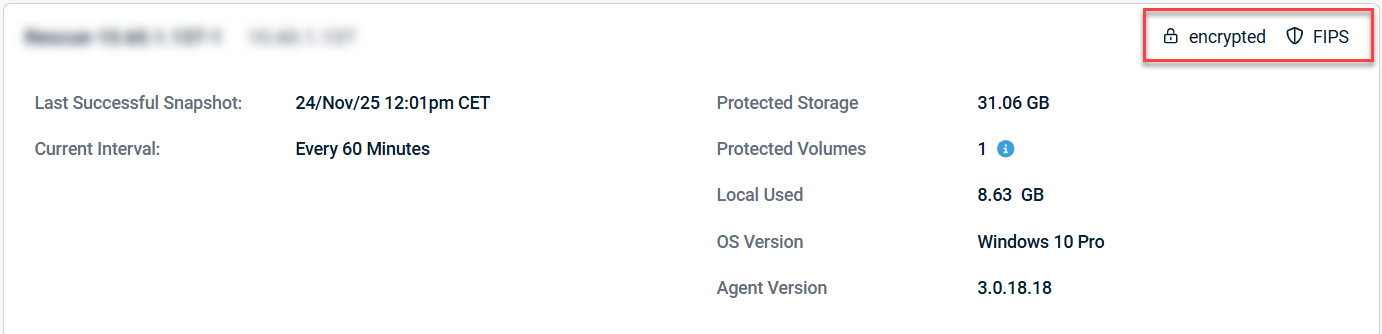
Currently added agents will need to be archived and re-added after FIPS mode is enabled on the device to utilize the FIPS encryption libraries.
Limitations
The following features are not currently FIPS-validated. They will be removed from this section as new updates are released, and they become covered.
- iSCSI connections
- iSCSI shares
- Volume Restores
- iSCSI rollback
- Samba connections
- Hosted NAS shares
- External NAS share backup
- File Restores
- Image Exports over samba
- Hypervisor connections
- Agentless backup
- Virtualization with Hypervisor
- Hybrid Virtualizations
Considerations
The customer is responsible for ensuring that the surrounding infrastructure, operating system configuration, networking environment, integrated services, and overall deployment architecture are configured and maintained in accordance with applicable FIPS 140-3 validation requirements.
Some restored data is provided over a secure channel to the user in unencrypted form. Organizations are responsible for handling restored data with appropriate security controls consistent with FIPS requirements.
Bare Metal Restore (BMR) restores data in non-encrypted format. After restore, users must re-enable FIPS mode in Windows.
During local verifications, data will be decrypted and the restored system will be booted to verify the backup. To maintain strict FIPS 140-3 compliance, these features can be disabled.
- Screenshot verification
- Integrity verification
- Ransomware detection
The Datto cloud supports 140-2 standards. If FIPS 140-3 is required, cloud replication may be disabled.
Migrations cannot be done between a FIPS enabled device and one that has not had the feature enabled.
SIRIS Private replication is not supported between a FIPS validated device and a device without FIPS validation.
Frequently Asked Questions
Can an unencrypted agent utilize FIPS mode? For an agent dataset to be FIPS-validated, it will need to be an encrypted backup. Encryption may only be enabled during pairing, so if you would like to encrypt a currently unencrypted agent, it will need to be archived or removed, then re-added to the device as an encrypted agent.
What is the difference between FIPS validated backups and normally encrypted agent backups? In addition to encrypting the datasets, FIPS-validated backups are transmitted through an encrypted tunnel and comply with FIPS guidelines.
How do I disable the local verification for an agent? Both the screenshot verification and local verification may be disabled on an agent basis within the Remote Web. Information on these settings can be found in the verification section of Configure Agent / System Settings Page.
I dont see the option to enable FIPS mode?Confirm that the device is one that supports FIPS by checking the Environment section of this article. If you device is a supported model and the option is not present, please confirm that it is updated to the latest version. If you still do not see the option or need assistance updating the IBU of the device, please reach out to Datto Technical Support.


